






How do I open a RAR file? Open RAR files with BitZipper!
|
Need to open a RAR file? Then you have come to the right place! Accessing files in RAR archivesTo access files stored in a RAR archive, you need a RAR file extractor that can read them. BitZipper is such a tool. It reads RAR files and 46 other archive types.
After installing BitZipper, you can open a RAR file simply by double-clicking it, by right-clicking on it in Windows Explorer, or by starting BitZipper and opening the ZIP file the same way you open a document in your word processor. It really is very easy. |

|

|
 |
 |
What is a RAR file?
A RAR file is a collection of documents, programs or other files that have been reduced in size and bundled together in a single compressed file (called an 'archive').
This is done to ease distribution on the Internet and to reduce download time. The RAR file format is similar to the more well known ZIP file format, with the main difference between RAR and ZIP being that RAR compresses files slightly better. RAR (Roshal Archive) is named after the inventor of the format, Eugene Roshal.

Extracting RAR files with BitZipper - a visual guide
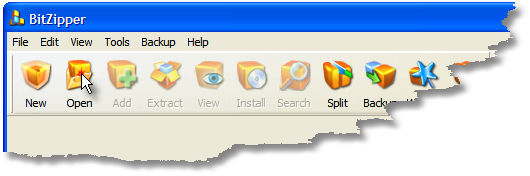
First of all, after downloading the BitZipper trial version, run the downloaded file once to install BitZipper on your PC. When done, you can open RAR files simply by double-clicking on them. Alternatively, start BitZipper from the Start menu and click the Open button:
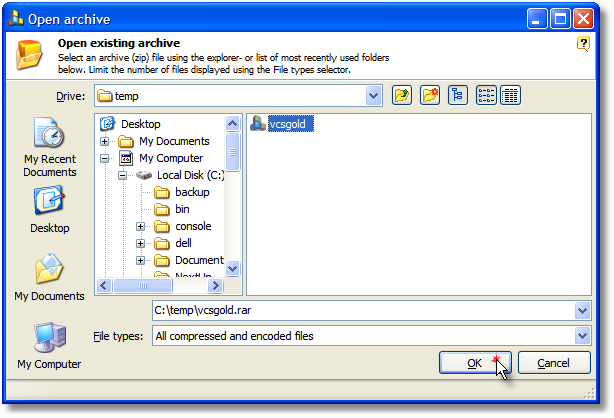
After clicking Open, a screen is displayed where you need to select your RAR file and click the OK button:
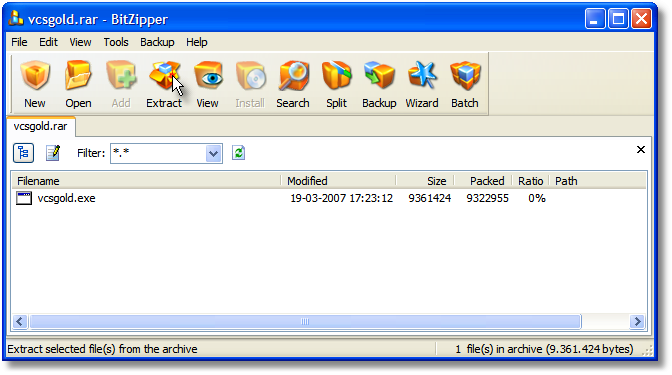
BitZipper will now show you the files stored inside the RAR archive. To extract (decompress) them, so you can work with them, click the Extract button:
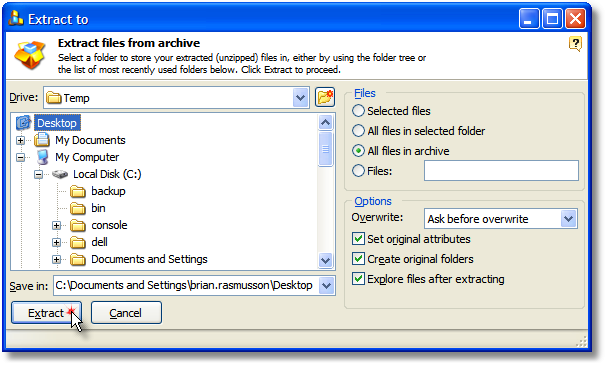
After clicking Extract, a screen is displayed where you need to decide where to store the files you are extracting from the RAR archive. Also make sure that the 'All files in archive' option is selected if you wish to extract all files from the RAR file. Click Extract to proceed.
That's it! You have opened and extracted files from a RAR file.
BitZipper can decompress files using 44 different compression formats without requiring any external tools, so it is highly unlikely that you will come across any compressed file that you cannot decompress with BitZipper if you decide to buy it.
The step-by-step tutorial above applies for all types of files that BitZipper supports: 001, 7Z, ACE, ARC, ARJ, BH, BZIP2, BZ2, CAB, CHM, CHW, CPIO, DEB, DMG, DOC, ENC, EXE, GZ, GZIP, HFS, HXS, ISO, JAR, LHA, LZH, LZMA, MSI, PPT, RAR, RPM, TAR, TBZ, TGZ, UU, UUE, WAR, WinRAR, WIM, XAR, XXE, XLS, Z, ZIP, ZOO - with more to come!
|
|
|
|